 Flashiibo
3: Bypassing Daily Scan Restrictions (UID Randomization)
Flashiibo Pro / Visual Tutorials / Daily Scan Limits
Most Nintendo Switch titles (notably The Legend of Zelda: Breath of the Wild and Tears of the Kingdom) restrict each amiibo to one scan per calendar day.
The console knows whether an amiibo has already been scanned today by checking the unique serial number (Tag UID) stored on the tag.
Flashiibo allows you to bypass this cooldown through Automatic UID Randomization (Auto UID) or Manual UID Randomization (New Tag UID), letting you scan the exact same amiibo repeatedly without changing your console clock. Out of the box, Flashiibo comes with Zelda mode enabled by default, giving you instant unlimited daily item drops in Zelda titles while protecting your saved data in games like Super Smash Bros.
Step 1: Check Current Base Serial Number (UID)
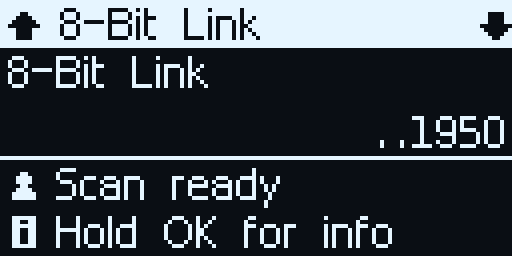
When an amiibo is selected and ready to scan, its current serial number is shown at the bottom of the screen:
- In this example,
8-Bit Linkhas a UID ending in19 50. - If you scan this tag on your Switch, the game grants daily chests and materials. If you try to scan it a second time immediately, the game says: “You can’t use this amiibo again today.”
Step 2: Open the Amiibo Options Menu
To view or adjust UID randomization options:
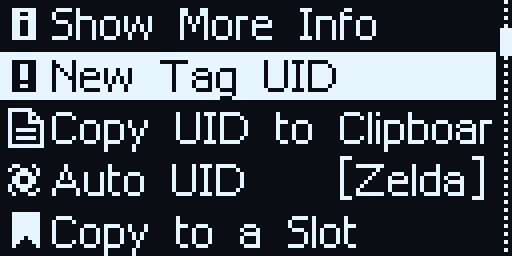
- Long-press the OK button (~1 second) while on the character screen.
- The options menu will open:
- Show More Info
- New Tag UID: Generate a single new serial number once on demand.
- Auto UID: Cycle between
Zelda(default),ON, andOFF. - Back
Step 3: Manual Randomization (New Tag UID)
- Highlight New Tag UID in the menu using UP / DOWN.
- Press the OK button.
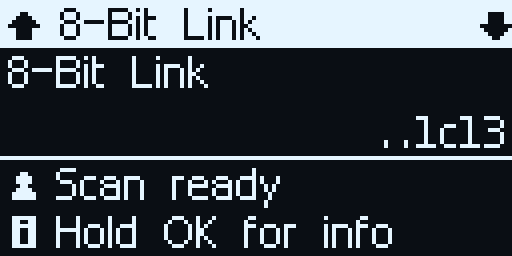
- Flashiibo creates a fresh, unique serial number for the amiibo.
- Notice the UID has changed from ending in
19 50to1c 13. - The Nintendo Switch now recognizes this amiibo as a brand-new physical figure!
- Tap Flashiibo against your controller again to immediately receive another daily reward drop.
Step 4: Automatic Randomization (Auto UID)
For effortless farming of rare chests, weapons (such as the Twilight Bow or Biggoron’s Sword), armor, and special glider fabrics, Flashiibo includes Auto UID to regenerate serial numbers automatically upon every scan.
What is “Zelda” Mode? (Default)
Out of the box, Flashiibo Pro is set to Zelda mode by default:
- Automatic Zelda Scans: Whenever you scan any The Legend of Zelda (TLOZ) amiibo, Flashiibo automatically generates a fresh Tag UID on the fly. You can scan Link, Zelda, or Guardian figures repeatedly in Breath of the Wild and Tears of the Kingdom to claim unlimited daily drops without ever opening a menu or pressing a button.
- Smart Super Smash Bros Protection: Zelda mode intelligently excludes The Legend of Zelda characters that belong to the Super Smash Bros amiibo series (such as SSB Link, Zelda, Sheik, Ganondorf, and Toon Link). Because Super Smash Bros Ultimate saves training data, levels, and stat boosts directly to the amiibo tag, randomizing its UID would cause Smash to treat it as an unregistered figure and disconnect your trained Figure Player (FP).
- Protection for Other Games: Non-Zelda amiibos retain their fixed UIDs as well, protecting your saved gear in Splatoon and other titles that require stable tags.
Cycling Auto UID Options
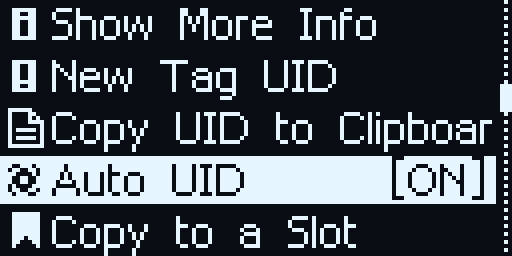
If you want to change the randomization mode, open the options menu (long-press OK) and press OK on Auto UID to cycle between the three settings:
Auto UID [Zelda](Default): Auto-randomizes all The Legend of Zelda amiibos while protecting SSB Zelda figures and other series. Recommended for nearly all players.Auto UID [ON]: Automatically randomizes the serial number on every scan for all amiibo figures across all franchises (Mario, Metroid, Fire Emblem, Kirby, etc.).Auto UID [OFF]: Disables auto-randomization completely. Serial numbers remain fixed and stable across all scans until you manually select New Tag UID.
Summary: UID Modes Compared
| Mode | How it Works | Best Used For |
|---|---|---|
| Auto UID [Zelda] (Default) | Automatically generates a new UID on every scan for The Legend of Zelda amiibos, while preserving stable UIDs for Super Smash Bros and all other franchises. | Daily farming in BOTW & TOTK without risking your trained Smash Bros Figure Players or Splatoon gear. |
| Auto UID [ON] | Generates a new random serial number on every single scan across all amiibos. | Fast, unlimited daily drops across all games and series without restrictions. |
| Auto UID [OFF] | Keeps all serial numbers strictly fixed and unchanged between scans. | Dedicated amiibo training in Super Smash Bros Ultimate or saving gear loadouts in Splatoon. |
| New Tag UID | Generates a single new serial number on demand when selected from the options menu. | Claiming a quick extra daily scan on a specific figure without enabling automatic randomization. |
[!CAUTION] Smash Bros Figure Players:
When training an amiibo fighter in Super Smash Bros Ultimate, keep Auto UID onZelda(default) or set it toOFF. Do not useAuto UID [ON], because randomizing an amiibo fighter’s UID causes Smash to treat it as a brand-new, untrained figure.
| ← Previous: 2 - Browsing & Emulating Amiibo | Visual Tutorials Hub | Next: 4 - Uploading & Importing FCA Files → |